
The documentation API is protected by TLS mutual authentication protocols. As such, you'll need to specify in Postman the SSL public certificate and private key that need to be used to encrypt the transport layer.
As mentioned in the first paragraph of this procedure, Preconditions #4, a compliant certificate from Abrumet (see https://doc.brusafe.be/display/MQE/Certificates) is needed. Once the demand has been approved, a '.crt' file and a '.key' file which represents the private and public key linked to the mutual authentication protocol are given. Save these two files in a known directory.
To configure the certificate path in Postman, you'll need to open the settings :
- Open the gears on the top right corner of the user interface
 and open Settings
 - Go to the "Certificates" tab
Click on "Add Certificate", a new tab opens :
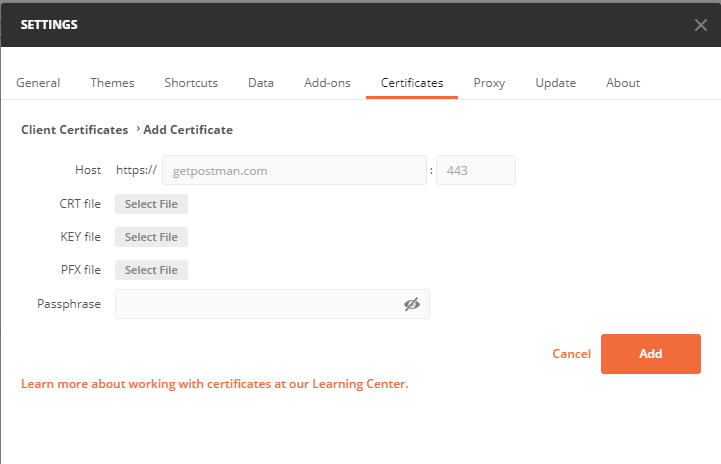
- Fill the host field with the base URL of the documentation API : https://api.qa.brusafe.be (For production, another certificate should be configured)
- Select the '.crt' and '.key' files in their respective emplacement. Assign the path where you saved your Abrumet certificate and key as your selection
- Press "Add"
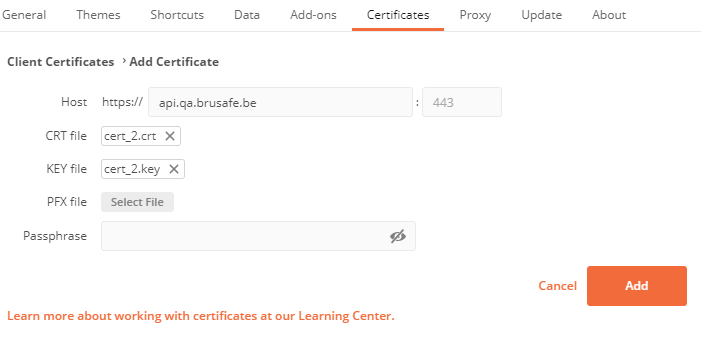
The documentation API SSL security layer is now set.