
In order to ease the testing, several parameters have been implemented as variables. Prior to doing any request you should set up your project personal parameters.
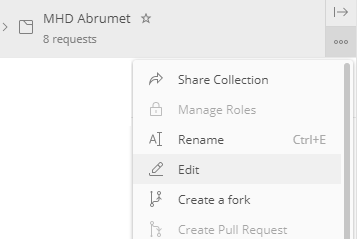
Postman allows you to set variables for a specific collection. To access these variables, select the three dots next to the collection folder on the left panel and click on Edit :
The following window should open, select the "Variables" table :
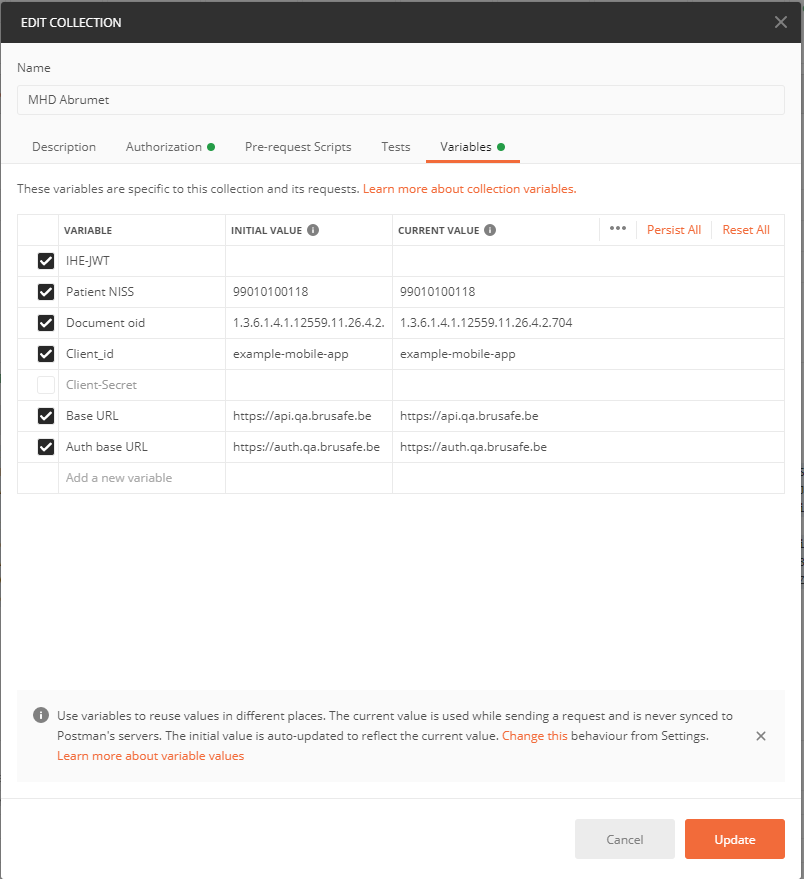
These variables need to be adapted as you go through your tests.
- IHE-JWT – This variable is the authorization token. As previously detailed, this variables will be used in the Document API folder as Authorization token. For more details, you can switch to the "Authorization" tab of the folder but everything should be properly set. This variable should be updated automatically by Postman.
- Patient NISS – This variable represent the patient NISS. If another patient should be used, you need to modify the NISS on this variables (note that a different JWT will need to be retrieved)
- Document oid – This variable can be used in a postman script in order to automate the process. It represents the ID needed to call the 'Retrieve Binary' as explained previously. It should change each time you would like to retrieve a document.
- Client_id and Client-Secret – These two variables are defining the Open-ID-Connect part of the authentication process.(see above : "How to get your access token")
- The documentation API base URL (Base URL) and the Authorization base URL (Auth base URL) can be also changed here as they are environment dependent (QA, TST, PRD). These would not likely change as Postman is set for and would be used in QA only.
Updating those variables should be the main interaction that is needed to make the API work.
Before moving forward, the firsts parameters should be set up in the variable tab as showed in the picture above.
Fields required for the next step : Patient NISS, Base URL, Auth base URL, Client_id and Client_secret (if necessary)